
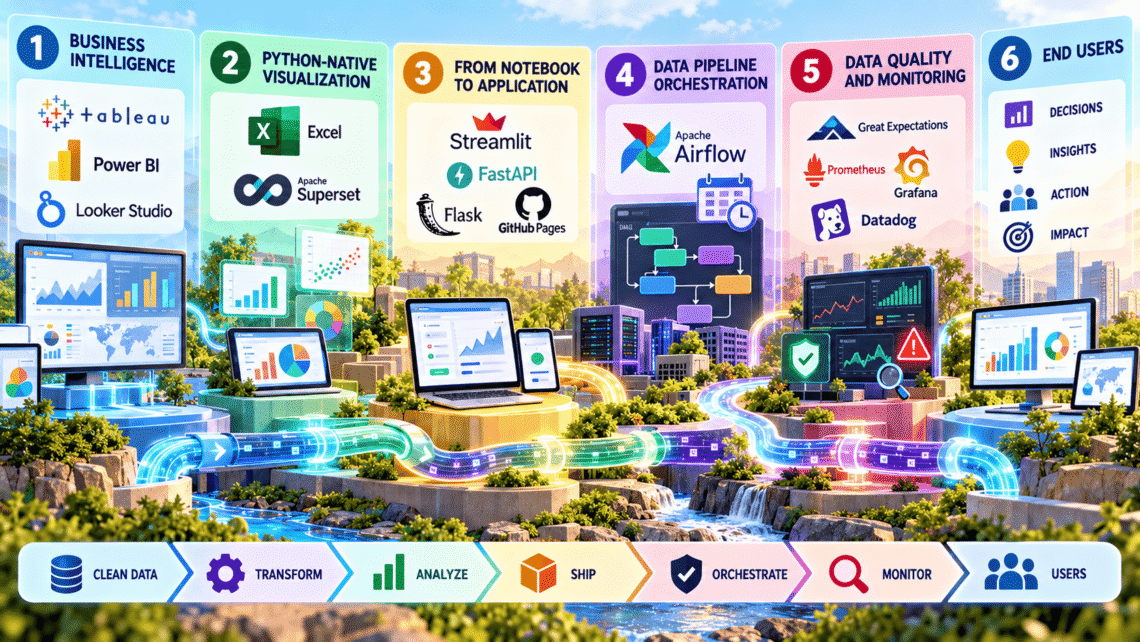
Visualization and Data Pipeline Orchestration: Part 3: The Complete Data Analytics Stack
This is Part 3, the final article in a three-part series on the modern data analytics stack. Part 1 covered sources, ingestion, and storage. Part 2 covered processing and modeling. Part 3 covers visualization, deployment, and data pipeline orchestration.
Where Engineering Meets the End User
Parts 1 and 2 of this series covered how raw data becomes clean, modeled, analyzable data. This final article covers what happens next. How that data reaches human decision-makers through visualization, how analytical tools get shipped as real applications, and how the entire pipeline stays reliable through proper data pipeline orchestration. This is where engineering rigor either pays off visibly or quietly fails at the last mile.
Business Intelligence Tools: Architecture Behind the Dashboard
Tableau, Power BI, and Looker Studio look similar on the surface, dashboards, charts, drag-and-drop interfaces, but their underlying architectures differ in ways that genuinely affect performance at scale.
Tableau’s core technical innovation is its VizQL engine, which translates a user’s visual drag-and-drop actions directly into optimized database queries. Critically, Tableau supports two distinct connection modes. Live connection queries the source database directly for every interaction, guaranteeing fresh data but adding query latency on every click. Extract mode instead pulls data into Tableau’s own proprietary columnar engine, Hyper, which compresses and indexes data specifically for fast interactive querying, trading data freshness for dramatically faster response times.
Power BI’s architecture centers on its VertiPaq engine, an in-memory columnar storage system that compresses data extremely aggressively, often achieving compression ratios of ten to one or higher, by exploiting the same column-level similarity advantage described in Part 1’s warehouse discussion. This compression means Power BI can hold datasets that would be genuinely large on disk entirely in RAM, enabling near-instant filtering and aggregation across millions of rows without touching the source system at all.
Looker Studio takes a fundamentally different approach through LookML, a modeling layer that sits between the raw warehouse tables and the visualization itself. Rather than each analyst writing their own ad hoc SQL, LookML defines reusable metrics and dimensions centrally, then compiles them into optimized SQL at query time. This solves a real organizational problem within any data analytics stack. Metric drift, where two analysts calculate “revenue” slightly differently and produce conflicting numbers in different dashboards.
Python-Native Visualization: Excel, Apache Superset, and the Analyst’s Toolkit
Microsoft Excel remains embedded deep inside this layer of the data analytics stack for a specific reason. Its calculation engine uses a dependency graph nearly identical in concept to Spark’s DAG from Part 2, recalculating only the cells actually affected by a given change, rather than recomputing an entire spreadsheet from scratch on every edit.
Apache Superset, by contrast, is built as a genuinely open-source alternative to commercial BI tools, using SQLAlchemy as a database abstraction layer that lets it connect to virtually any SQL-speaking data source through a consistent interface. Superset’s architecture separates the semantic layer, where datasets and calculated metrics get defined once, from the visualization layer itself, allowing the same underlying metric definition to power multiple different chart types without duplicating logic.
From Notebook to Application: Streamlit, FastAPI, and Flask
A genuinely important transition inside any mature data analytics stack is moving analytical work from a notebook, as discussed in Part 2, into something other people can actually use without touching code.
Streamlit solves this through a deceptively simple execution model. Every single user interaction, a slider move, a button click, triggers a full re-execution of the entire Python script from top to bottom. This sounds inefficient, and without optimization it would be, but Streamlit’s caching decorators, specifically @st.cache_data, memoize expensive function calls, storing their results so repeated calls with identical inputs return instantly rather than recomputing. This lets developers write straightforward, linear Python code while still achieving genuinely responsive interactive applications.
FastAPI addresses a different need entirely, serving models and data as production APIs rather than interactive dashboards. Its defining technical feature is native support for Python’s async and await syntax, built on the ASGI standard rather than the older, synchronous WSGI standard that Flask traditionally used. This matters concretely for performance. An async endpoint can handle a new incoming request while waiting on a slow database query for a previous request, rather than blocking entirely until that query completes, giving FastAPI significantly higher throughput under concurrent load for I/O-heavy workloads, exactly the kind common in data-serving APIs.
Flask remains genuinely relevant specifically because of its minimalism. It provides no built-in ORM, no enforced project structure, and no default async support, giving developers complete architectural control. For a small internal tool or a simple model-serving endpoint where FastAPI’s async capabilities are not particularly needed, Flask’s simplicity often means less code and fewer moving parts to maintain.
GitHub Pages serves a narrower but genuinely useful role, hosting fully static output, pre-rendered reports, documentation, or client-side-only visualizations, directly from a repository with zero server infrastructure required at all.
Data Pipeline Orchestration: Apache Airflow
Every component covered across all three parts of this series eventually needs to run on a schedule, in the correct order, with proper failure handling. This is precisely the job of data pipeline orchestration, and Apache Airflow remains the dominant tool for this layer.
Airflow’s core abstraction is the DAG, conceptually similar to Spark’s execution graph from Part 2, but operating at a much coarser level. Instead of individual data transformations, an Airflow DAG orchestrates entire tasks, extract this table, run this dbt model, train this scikit-learn model, send this alert, each represented as a node, with edges defining dependencies between them.
The genuinely critical technical property Airflow provides is idempotency support combined with retry logic. A well-designed Airflow task can fail partway through, get automatically retried according to a configured policy, exponential backoff between attempts, a maximum retry count, and produce the exact same correct result as if it had succeeded the first time, provided the task itself was written to be idempotent, meaning running it twice with the same inputs produces the same output rather than duplicating data. This property is what makes reliable data pipeline orchestration possible at all in a distributed system where individual components will inevitably fail occasionally.
Data Quality and Monitoring: Closing the Loop
Great Expectations addresses a problem every mature data analytics stack eventually confronts. Silent data quality degradation. It lets engineers define explicit, machine-checkable expectations about data, this column should never be null, this value should fall within this range, then validates incoming data against those expectations automatically, failing a pipeline run loudly rather than letting corrupted data flow silently downstream into a dashboard or a trained model.
Prometheus and Grafana together form the observability half of data pipeline orchestration. Prometheus operates on a pull-based model, periodically scraping metrics from configured endpoints and storing them as time series data, while Grafana provides the visualization layer on top, rendering those metrics as dashboards and triggering alerts when values cross defined thresholds. Datadog offers a comparable, more fully managed alternative, combining metrics, logs, and traces into a single platform specifically to help engineers diagnose exactly where in a complex, multi-stage data analytics stack a given failure actually originated.
Conclusion to the Series
Across three parts, this series has traced the complete technical architecture of a modern data analytics stack. Heterogeneous sources feeding into Kafka or NiFi ingestion, landing in columnar warehouses built on separated storage and compute. Spark’s in-memory DAG execution and dbt’s SQL-native transformation reshaping that raw data into something genuinely analyzable. And finally, visualization engines like VertiPaq and VizQL, deployment frameworks like FastAPI and Streamlit, and data pipeline orchestration through Airflow’s retry-aware DAG scheduling, tying every previous layer together into something reliable enough to run in production, unattended, day after day.
No single tool in this stack matters in isolation. What matters is understanding precisely why each architectural choice, columnar storage, lazy evaluation, idempotent retries, exists, and how each layer’s specific technical properties determine what the layers above it can actually achieve.


You May Also Like

The Remarkable Claude Enzyme Discovery: What an AI Found Hiding in Phage DNA
The Complete Data Analytics Stack: Part 1, From Raw Sources to Warehouse Architecture